|
This post was updated on .
hello Tarun,
i tried to run datadriven test using your csv reader function and i got stuck in the code below: FindAFlightData.class.getResource("/TestData/Resources/FlightTest/FlightData.csv").getPath())); however in your code it is: RegistrationData.class.getResource("/regData.csv").getPath())); what is the exact string to place inside getResource()? in my case i just copied the complete path of the file which is /TestData/Resources/FlightTest/FlightData.csv under the Project Mercury_tours that i created. by the way i wanna ask about the properties function in the RegistrationData class what is its purpose? do i need to include that on my data class? public RegistrationData() throws IOException { properties.load(RegistrationData.class .getResourceAsStream("/registrationdata.properties")); thanks Note: Edited the code above from FindAFlightData.class.getResource("/regData.csv").getPath())); to RegistrationData.class.getResource("/regData.csv").getPath())); (your original code) |
|
Administrator
|
Hi Ken,
I suppose you are referring to 7th Selenium Training Session which uses maven. Maven should automatically pick up file from resource folder. Could you post a snapshot of the project structure you have? Please expand all the folders in snapshot. It would help me debug the issue.
~ seleniumtests.com
|
|
Hi Tarun,
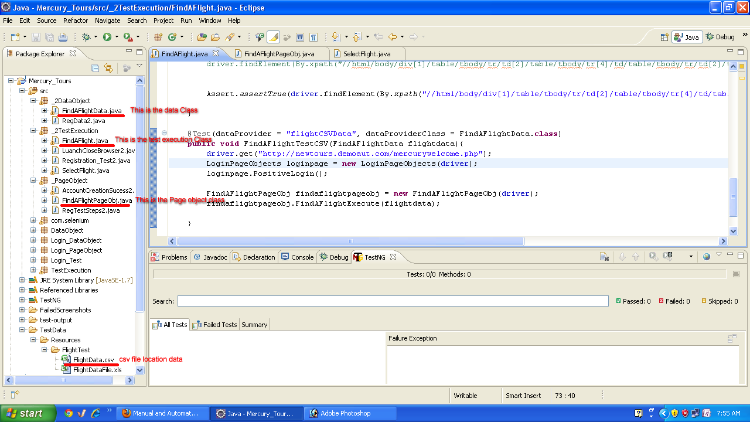
unfortunately i did not use Maven on my structure. i just copied the csvreader code and customized it based on my implementation. Please see image below for my project structure: ![]() Thanks in adavance Ken |
|
Administrator
|
Though image is not very clear, I get your point.
When using maven, it knows that it has to look for file in "resource" folder. But since you are not using maven you would have to adopt another mechanism. "getResourceAsStream" needs path to file but you can not provided it hard coded path because then test would not work in machine of other test engineers. You could build path dynamically, in this case. Consider I have test data file in following location - "C:\Users\tbhadauria\seleniumtestworkspace\apitesting\testdata\jsonexample.json"where "jsonexample.json" is my test data file. Now to get the absolute path to file, I can use - System.getProperty("user.dir")+"//testdata//jsonexample.json"
And then you can pass it to method - getResourceAsStream, so it becomes -
getResourceAsStream(System.getProperty("user.dir")+"//testdata//jsonexample.json")
Hope this helps.
~ seleniumtests.com
|
|
I'll try this solution and update you of the results...
Thanks Tarun |
|
i did apply your solution stated above but im having an error on the code
the code below: CSVReader csvReader = new CSVReader(new FileReader( FindAFlightData.class.getResourceAsStream(System.getProperty("user.dir")+"\\TestData\\Resources\\FlightTest\\FlightData.csv" ))); the error says: The constructor FileReader(Inputstream) is undefined. What could be the error here. Thanks |
|
Administrator
|
There seem to be extra bracket. It should be getResourceAsStream(System.getProperty("user.dir")+"//TestData//Resources//FlightTest//FlightData.csv"); Can you try this?
~ seleniumtests.com
|
|
I removed the brackets as suggested but i think it was not the problem. the problem still persists.
anyways i created a video capture of my structure to have clear view of my implementation http://screencast.com/t/Yx2kAPVb please see video on the link above. Thanks |
|
Administrator
|
Could you export your project and attached here?
Right Click on Project > Export > Archive File I would add jar files so you can ignore them in export.
~ seleniumtests.com
|
|
Hello Tarun,
i have created an archive file of the my structure. please see attached. Thanks...FlightTest.zip the specific code with the error is in FindAFlightData.class |
|
Administrator
|
Hi Ken,
I assume that you have CSV reader in file path. The problem we had was that constructor FileReader was looking for file path while we passed stream to it. I should have noticed it earlier. Right code would be - CSVReader csvReader = new CSVReader(new FileReader(
FindAFlightData.class.getResource(System.getProperty("user.dir")+"//TestData//Resources//FlightTest//FlightData.csv" ).getPath()));Here we pass path of file to FileReader constructor. Hope this helps. I would elaborate more on these topics once I begin with java training.
~ seleniumtests.com
|
|
Ill Try this and feedback as soon as i get the results.
java training is indeed helpful. ill be looking forward for that soon Thanks... |
|
Hi Tarun,
Caused by: java.lang.NullPointerException at _2DataObject.FindAFlightData.getCSVData(FindAFlightData.java:189) i got the error above at the exact code you suggested. i should be learning java in depth.
|
|
Administrator
|
I can debug it but I am curious to know why you don't want to follow maven which makes it easy to read data from external resources
~ seleniumtests.com
|
|
i'll try to review the maven session. i didn't clearly get the maven tutorial.
that's why i just followed my own structure in performing my test. anyways thanks a lot.... |
|
Administrator
|
hm in that case could you tell me what you tried with maven and where you found difficulties.
I would try to help
~ seleniumtests.com
|
|
what i don't get about the tutorial is that how to create the project structure because you just copied the commands from notepad. i wasn't able to get how and why those commands were used.
and also in converting the current project to maven structure project. Thanks.... |
|
Administrator
|
The command I used in tutorial is to create maven project template and then more packages, files etc could be added to it. I used maven archetype for it. Did you execute this command and got sample maven project?
~ seleniumtests.com
|
|
i was able to create a sample project with the commands given on the tutorial.
and the challenge now is converting my current structure to maven. what i did was i converted it thru right click on the project then configure-->convert to Maven Project. i was expecting that it will automatically be structured same as your example where folders are arranged in src\main\ (for main classes) and src\test (for test execution classes). but it still has the same structure as the previous project the only diff is it has "M" on the project folder. do i still need it to structure the folders manually?to follow that convention? |
| Free forum by Nabble | Edit this page |